A Complete Guide to Creative Pen Tablets and Digital Art Tools
In a digital world powered by creativity, artists, designers, students, and content creators increasingly rely on advanced tools to bring ideas to life on screen. Whether you are sketching illustrations, editing photos, designing graphics, or annotating documents, having the right drawing tablet can transform your creative workflow.
Publish Date: 2025-12-11
Views: 543
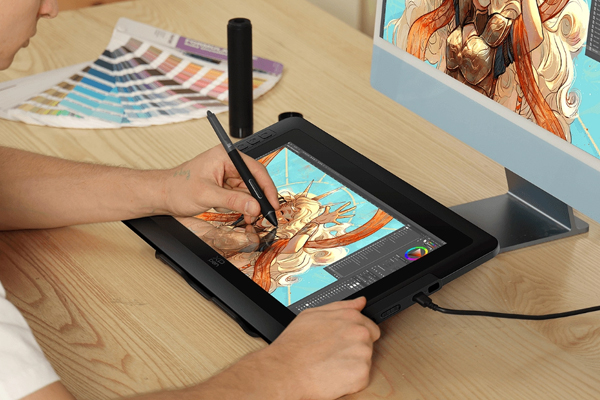
XP‑Pen has emerged as one of the most respected and widely used brands in the graphic tablet industry offering professional‑grade tablets at accessible prices for users of all levels. (xp‑pen.com)
XP‑Pen devices combine precision, responsiveness, and
intuitive design, making them popular among illustrators, animators,
photographers, game artists, and even educators. Easier to use than a mouse and
more expressive than a trackpad, XP‑Pen drawing tablets allow artists to work
naturally just like drawing on paper. In this in‑depth guide, we explore what
XP‑Pen is, how it works, its product lineup, key features, pricing, advantages,
limitations, and why it remains a top choice for digital creators in 2026.
What Is XP‑Pen
XP‑Pen is a technology brand that specializes in graphic
tablets, pen displays, stylus pens, and creative accessories designed for
digital art and design workflows. Founded with a mission to make digital
creativity accessible to everyone, XP‑Pen has developed a broad product
ecosystem that caters to beginners, hobbyists, professionals, and enterprises.
(xp‑pen.com)
The core of XP‑Pen’s innovation lies in its pressure‑sensitive
stylus pens and responsive tablet surfaces that enable accurate and natural
drawing experiences. Unlike traditional input devices like mice, XP‑Pen tablets
allow users to draw, paint, and edit with precisioncapturing subtle differences
in pressure and tilt that mimic real‑world tools like pencils, brushes, and
markers.
How XP‑Pen Devices Work
At the simplest level, XP‑Pen devices consist of two major
components:
1.
The Tablet or Pen Display – A
surface where users draw or interact with digital content. Some models feature
a display screen that shows your artwork directly, while others connect to a
computer where the artist sees their work on the monitor as they draw.
2.
The Stylus Pen – A
pressure‑sensitive pen that responds to how hard the user presses, allowing
natural line variation and control.
Once connected to a computer via USB or wireless
connection, XP‑Pen devices work seamlessly with creative software such as Adobe
Photoshop, Illustrator, Clip Studio Paint, Corel Painter, Krita, Blender, and
many others.
As users draw on the tablet surface with the stylus, the
device translates movements into digital strokes on the screen providing
smooth, lag‑free input that feels intuitive and natural.
XP‑Pen Product Lineup
XP‑Pen offers an extensive portfolio of creative devices.
The range includes basic pen tablets for beginners, advanced pen displays for
professional artists, and accessories that enhance usability. Here’s an
overview of XP‑Pen’s key product categories:
Pen Tablets
Pen tablets are compact devices without a built‑in screen.
The artist draws on a tablet surface while viewing the result on a connected
computer. These models are budget‑friendly and ideal for beginners, students,
and hobbyists.
Popular models include:
- Star
Series – Designed for first‑time users and
students
- Deco
Series – Offers larger work areas and
customizable shortcut keys
These tablets focus on providing reliable performance at
accessible price points.
Pen Displays
Pen display tablets feature an integrated screen that lets
users draw directly where they see the artwork. This direct‑to‑screen approach
feels more natural and reduces the learning curve.
Popular display models include:
- Artist
Series – Professional‑grade displays with
vibrant color support
- Artist
Pro Series – Designed for demanding workflows with
higher resolution and wider color gamut
Pen displays are particularly suitable for professional
illustrators, animators, and designers who want a studio‑level experience.
Portable and Wireless Options
Recognizing the needs of creators on the go, XP‑Pen alsooffers wireless pen tablets and portable displays that pair with laptops and
tablets. These devices allow artists to work without being tethered to a
desktop setup — ideal for remote work and travel.
Stylus Pens and Accessories
XP‑Pen’s stylus pens are battery‑free, lightweight, and
support high levels of pressure sensitivity. Many pens also support tilt
recognition, enabling more natural shading and brush effects. The company also
offers replacement nibs, stands, and protective cases.
Key Features of XP‑Pen Devices
What makes XP‑Pen devices appealing to creators around the
world? Several features define the brand’s value and performance:
High Pressure Sensitivity
XP‑Pen stylus pens typically support high‑resolution
pressure levels (commonly 8192 levels), which allows artists to draw fine,
precise lines that respond dynamically to pressure changes.
Tilt Recognition
Tilt support enables artists to create natural shading
effects — similar to tilting a pencil or brush in traditional media.
Large and Customizable Work Area
Many XP‑Pen tablets provide generous active areas for
drawing, along with customizable shortcut keys that help streamline workflows.
Compatibility With Creative Software
XP‑Pen devices work with all major design and art programs
across Windows, macOS, and some Linux environments — making them versatile for
different creative workflows.
Lightweight and Ergonomic Design
XP‑Pen products aim for comfort during long creative
sessions, with ergonomic pens and thoughtfully designed surfaces.
Affordable Options for All Skill Levels
XP‑Pen’s product range includes entry‑level devices for
beginners as well as advanced tools for professionals ensuring that creators
can find an option that fits their budget and skill level.
How to Choose the Right XP‑Pen Tablet
Selecting the right XP‑Pen device depends on your needs,
experience, and creative goals. Here’s a breakdown to help you decide:
For Beginners
If you are just starting with digital art, a basic pen
tablet from the Star or Deco series is a great choice. These models provide
essential features at a friendly price and help new users get comfortable with
digital input.
For Intermediate Creators
Artists who want more space and custom controls might
prefer larger tablets with programmable buttons and improved performance —
ideal for graphic design, digital painting, and illustration.
For Professionals
If you need a studio‑level experience with direct drawing
on screen, XP‑Pen’s Artist and Artist Pro pen displays offer high resolution,
color accuracy, and performance suitable for professional workflows.
For Portability
Travel artists, students, and remote workers should
consider wireless tablets or portable displays that can connect easily to
laptops without complex setups.
XP‑Pen and Creative Workflows
XP‑Pen devices enhance creative workflows by offering:
• Natural drawing and painting tools
• Efficient editing and retouching for photography
• Precise annotation for education or presentations
• Smooth navigation and gesture support in compatible software
• Customizable shortcuts to speed up repetitive tasks
Whether you are building illustrations, designing user
interfaces, creating animation frames, or crafting visual content, XP‑Pen can
accelerate your workflow and make digital expression more intuitive.
XP‑Pen Pricing and Value
One of XP‑Pen’s competitive strengths is its pricing
strategy. Compared to some other brands in the graphic tablet market, XP‑Pen
offers high‑performance tablets at affordable price points — making creative
tools accessible without compromising quality.
Entry‑level tablets provide excellent value for students
and beginners. Mid‑range and professional displays deliver features comparable
to premium alternatives but often at a lower cost. This makes XP‑Pen a
compelling choice for creators who want strong performance without a steep
investment.
Benefits of Choosing XP‑Pen
XP‑Pen has become a go‑to brand for many creative
professionals and hobbyists because it offers:
Affordable Access to Professional Tools
Artists no longer need to pay a premium to access pressure‑sensitive
tablets and pen displays with advanced features.
Versatility Across Creative Projects
XP‑Pen supports a wide variety of software and workflows —
from illustration and animation to photo editing and design.
Comfortable and Intuitive Drawing Experience
The natural feel of the stylus and responsive tablet
surface improve precision, creativity, and control.
Beginner‑Friendly Options
Entry‑level models make digital art accessible to students,
newcomers, and casual creators.
Strong Community and Support
XP‑Pen’s active user community, tutorials, and online
resources help users learn and get the most from their devices.
Limitations to Consider
While XP‑Pen offers many advantages, there are a few
factors to keep in mind:
Display Models Cost More
Pen displays with screens are priced higher than basic
tablets — though they still offer strong value relative to competitors.
Learning Curve for New Users
Artists transitioning from traditional media or mouse input
may need time to adjust to drawing tablets.
Screen Color Accuracy Varies by Model
While higher‑end displays deliver excellent color, some mid‑range
models may not match professional‑grade color calibration found in studio
monitors.
Battery‑Powered Devices May Require Frequent
Charging
Some wireless options need regular charging depending on
usage patterns.
Despite these considerations, many artists find XP‑Pen
devices to be reliable, responsive, and capable.
XP‑Pen Compared to Other Graphic Tablet Brands
In a crowded market that includes other major players, XP‑Pen
stands out for its balance of price, performance, and features:
XP‑Pen vs. Wacom — XP‑Pen
often offers similar features at a lower price point, though some high‑end
Wacom models still lead in color accuracy and advanced professional features.
XP‑Pen vs. Huion — Both brands deliver competitive devices, but XP‑Pen
is known for consistent build quality and strong software support across
platforms.
XP‑Pen vs. Apple Pencil with iPad — The Apple Pencil ecosystem is
powerful for mobility, but XP‑Pen tablets provide dedicated creative workflows
on larger screens and desktop environments.