The Complete Guide to Creative Cutting Machines and DIY Projects by Cricut
In the world of crafting and do-it-yourself projects, few tools have transformed creativity like Cricut machines.
Publish Date: 2025-11-14
Views: 17329
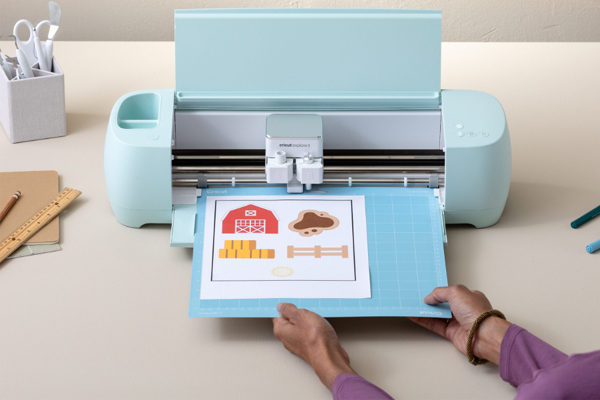
Cricut provides an innovative platform where imagination meets precision.
Cricut is a brand known for its intelligent cutting
machines and companion design software that allows users to create custom
projects with professional accuracy. From vinyl decals and custom apparel to
home décor and paper crafts, Cricut machines have become essential tools for
personalized crafting.
This guide explains what Cricut is, how it works, its key
products and tools, practical uses, pricing insights, pros and cons, and why it
continues to be a leader in the creative tools industry.
What Is Cricut
Cricut is a brand of smart cutting machines and design
software that empowers users to create custom projects with precision and ease.
The machines are capable of cutting a wide range of materials including paper,
vinyl, fabric, leather, felt, and even balsa wood. Cricut machines work in
combination with Cricut Design Space, a digital platform where users design,
customize, and prepare their projects for cutting, drawing, scoring, or
embossing.
The concept behind Cricut is to transform creativity into
reality without requiring advanced technical skills. Whether you want to
personalize gifts, design business products, or create decorative art, Cricut
provides the hardware and software tools to bring ideas to life.
How Cricut Machines Work
At its core, a Cricut machine receives design files from
the user through Cricut Design Space. Once a design is prepared, the user loads
the chosen material onto a cutting mat, places it into the machine, and the
Cricut device cuts or draws the design accurately.
The process typically involves:
Designing or selecting a project in Cricut Design Space
Selecting the material type to adjust precision settings
Loading the material on the appropriate cutting mat
Sending the job to the Cricut machine to cut, draw, score, or emboss
Removing the finished piece from the mat and completing the project
This workflow is simple enough for beginners while also
offering advanced options for experienced makers. Cricut Design Space includes
a library of pre-designed projects, fonts, and shapes that help users get
started quickly.
Cricut Design Space The Power Behind the
Machine
Cricut Design Space is the software hub that connects
creativity to the Cricut machine. It provides tools for designing, customizing,
and preparing projects. Users can:
Select from thousands of ready made designs
Upload personal images and fonts
Resize, rotate, and edit elements
Combine text and graphics
Choose material settings for precise cutting
Design Space is available on desktop and mobile devices,
allowing crafters to work wherever inspiration strikes. Whether users are
designing invitations, logos, stickers, or garment prints, Design Space gives
complete flexibility and control over the creative process.
Types of Cricut Machines
Cricut offers several models designed for a range of needs
and skill levels. Each model varies in features, capabilities, and price. The
most popular Cricut machines include:
Cricut Joy
Cricut Joy is the most compact and portable model. It is
ideal for simple, everyday projects such as custom labels, decals, cards, and
small crafts. Its small size makes it perfect for beginners, students, or
anyone who wants a quick and easy machine for lightweight projects.
Cricut Explore Series
The Explore series is designed for serious hobbyists who
want more power and materials options. These machines can cut a wider range of
materials with higher precision. They balance affordability with versatility,
making them one of the most popular choices for home crafters.
Cricut Maker Series
Cricut Maker machines are the most advanced models in the
Cricut lineup. They deliver powerful performance and can cut thicker and more
complex materials. With interchangeable tool heads, Cricut Maker machines can
cut fabric, leather, wood, and many other materials. This makes them favorites
among professional makers and small business entrepreneurs.
Each machine works with Design Space and supports
interchangeable tools such as fine point blades, rotary blades, scoring tools,
and pens.
Materials You Can Work With Using Cricut
One of the most impressive aspects of Cricut machines is
their ability to handle many materials. Depending on the model and tools used,
Cricut can work with:
Paper and cardstock
Vinyl for decals and wall art
Iron-on and heat transfer materials for apparel
Fabrics for sewing and quilting projects
Leather and suede
Felt
Balsa wood and chipboard
Specialty materials like foil and glitter paper
This versatility enables users to produce a wide range of
creative outcomes from personalized gifts to professional products.
Popular Creative Projects With Cricut
Cricut machines have become essential tools for both hobby
and business projects. Some of the most popular uses include:
Personalized apparel with iron-on designs
Custom decals for cars and walls
Handmade greeting cards and invitations
Custom stickers
Home decor items
Wedding signage and favors
Business branding products
Labels for organization
Because Cricut allows such precise cutting and creative
flexibility, users find themselves creating projects they never thought were
possible without professional equipment.
The Cricut Subscription And Project Library
Cricut offers a subscription option that enhances the
Design Space experience. Subscribers get access to:
A larger library of professional designs
Premium fonts and graphics
Exclusive project collections
Seasonal and trending design packs
For users who make crafts frequently, the subscription
provides more inspiration and quicker access to ready-to-use content.
This approach allows beginners to start for free while
giving frequent creators additional tools through the subscription.
Cutting Tools And Accessories That Expand
Capability
Cricut does not stop at cutting machines and software. The
brand also provides a range of tools and accessories that increase what users
can create:
Various cutting blades for different materials
Pens and markers for drawing and writing
Scoring stylus for perfect folds
Toolkits for weeding and assembly
Specialty mats for different material thicknesses
These accessories make the machine more capable and allow
makers to experiment and expand their skills.
Benefits of Using Cricut For Hobbyists And
Professionals
Cricut machines offer many advantages, including:
High precision cutting that is difficult to achieve by hand
Wide compatibility with materials
A strong project library with design ideas
Ease of use for beginners
Advanced tools for expert crafters
Cross-platform software for desktop and mobile
Inspiration and community support
These benefits make Cricut one of the most trusted brands
in the craft and maker industry.
Pricing And Value
Cricut machines range in price depending on the model and
capabilities. The smaller Joy models are more affordable, while the Maker
series is priced higher due to its advanced functions.
In addition to the machine price, users may invest in
accessories, tools, materials, and optional Cricut subscriptions. While it can
be an investment, many users find that Cricut pays off by saving time,
improving quality, and enabling professional results.
Cricut Compared to Other Cutting Machines
The market has several cutting machine brands, but Cricut
stands out for its balance of ease of use, precision, and creative freedom.
Other brands may focus on specific skills or niche audiences, while Cricut
provides a comprehensive system that suits beginners, hobbyists, and
professionals alike.
Cricut machines offer a powerful combination of technology
and creativity that makes crafting accessible to everyone. With user-friendly
design tools, versatile material support, and a supportive community, Cricut
continues to lead the creative tools market.
Whether you want to start a small business, produce custom gifts, or simply explore your creative potential, Cricut provides the tools and inspiration to make your ideas real.